
🆕 New in Version 3.4
Media trim, drag & drop images, a rebuilt CSS editor and more...
See what's new →🆕 New in Version 3.4
Media trim, drag & drop images, a rebuilt CSS editor and more...
See what's new →The structure of the base URL will be:
http://ip-address-of-host-machine:4001/api/project-id/
For all requests to H2R Graphics, use the following base url, as seen in the Launcher window.
For example…
If the Rundown URL is http://192.168.8.153:4001/rundown/ABCD/
The base URL is http://192.168.8.153:4001/api/ABCD/
Learn how to take full advantage of this API here: Companion module
If a request can’t be carried out, the API responds with an error rather than silently doing nothing. You’ll get an error response when:
This makes it much easier to debug an automation or a Companion button that isn’t behaving, as a failed request now tells you what went wrong instead of appearing to succeed.
Most HTTP methods below will rely on a URI and a JSON object.
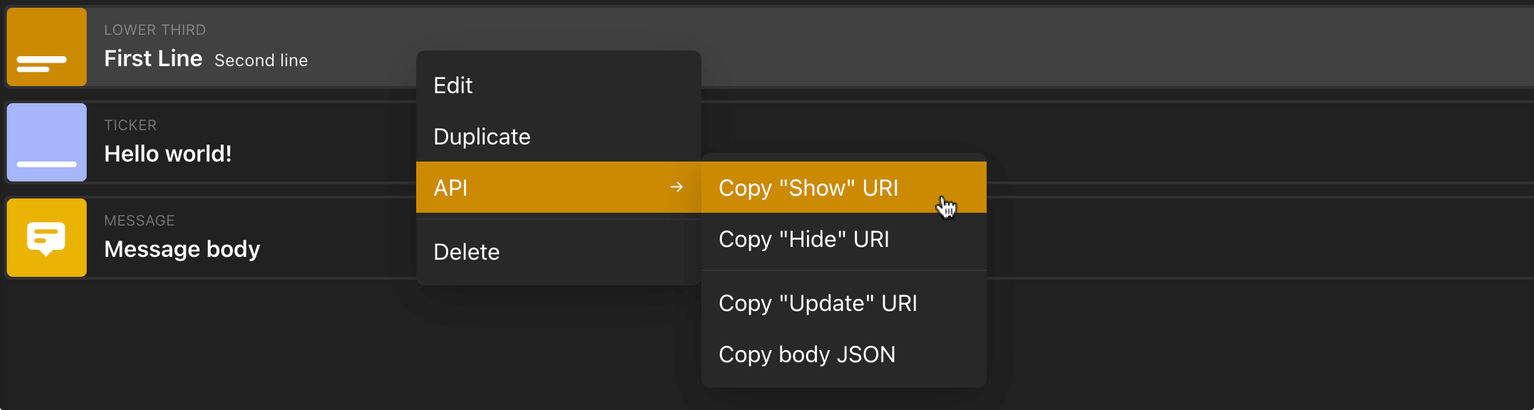
Keep in mind that the fastest way to to this information is within the Rundown, by right-clicking on any graphic that you want to show/hide/update.
POST http://base_url/run
POST http://base_url/clear
POST http://base_url/graphic/<graphic-id>/show
Pro tip: Right-click any graphic on your rundown to Copy "Show" URI.
POST http://base_url/graphic/<graphic-id>/hide
Pro tip: Right-click any graphic on your rundown to Copy “Hide” URI.
POST http://base_url/graphic/<graphic-id>/update
body object
Pro tip: Right-click any graphic on your rundown to Copy "Update" URL and to Copy body JSON.
POST http://base_url/graphic/<graphic-id>/updateScore/<team>/<level>/<type>/<amount>
team is the number of the team, likely 1 or 2.level is the score to update. Likely 1, 2, 3 or 4.type is a string depending on how the score should change. Either set, up or down.amount is the number to set, increment or decrement to score by.Example: graphic/1234/updateScore/1/1/up/10
This would affect team 1, level 1, and add 10 points to the score.
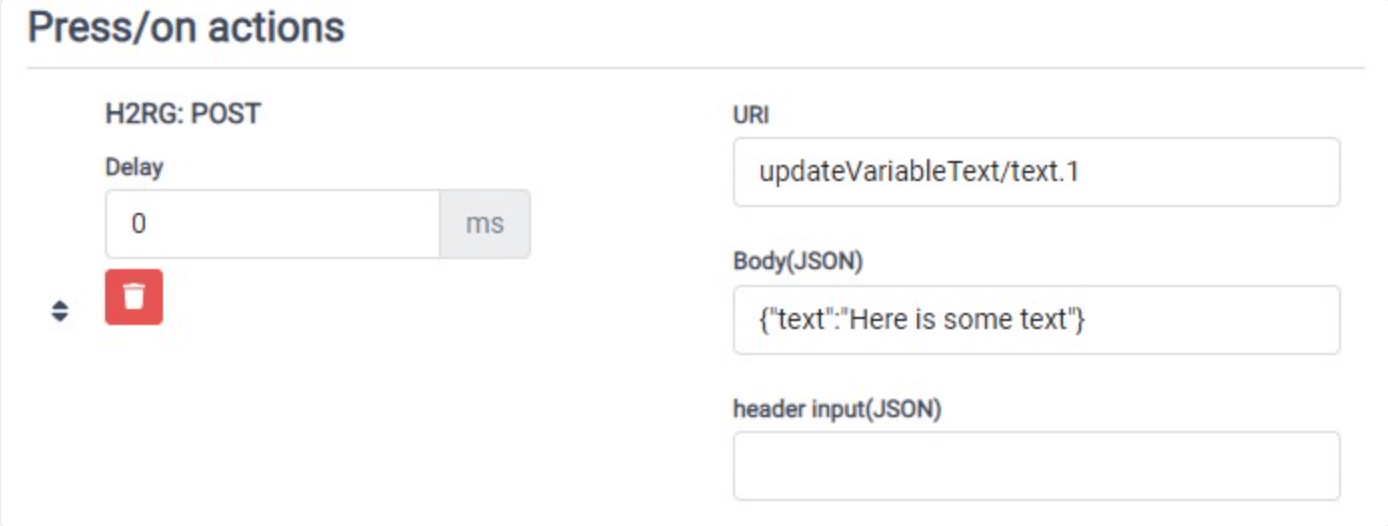
POST http://base_url/updateVariableText/<variable-text-id>
Request Body
text String
POST http://base_url/updateVariableList/1/selectRow/next
Replace next with previous or <number> to select a specific row.
POST http://base_url/output/<output_number>/open
Path Parameters
output_number String - 1, 2, 3 or 4
POST http://base_url/graphic/<graphic_id>/timer/run
POST http://base_url/graphic/<graphic_id>/timer/pause
POST http://base_url/graphic/<graphic_id>/timer/reset
POST http://base_url/graphic/<graphic_id>/timer/jump/<amount_in_seconds>
Path Parameters
<amount_in_seconds> Number
10 would add 10 seconds.-10 would subtract 10 seconds.POST http://base_url/graphic/<graphic_id>/timer/duration/<amount_in_seconds>
POST http://base_url/graphic/<graphic_id>/lyric/next
POST http://base_url/graphic/<graphic_id>/lyric/previous
POST http://base_url/graphic/<graphic_id>/lyric/start
Simplify your graphics workflow
Start using graphics on your live stream or video productions.
Get H2R Graphics product updates
New features, releases and tips, straight to your inbox.
No spam. Unsubscribe any time.