
🆕 New in Version 3.4
Media trim, drag & drop images, a rebuilt CSS editor and more...
See what's new →🆕 New in Version 3.4
Media trim, drag & drop images, a rebuilt CSS editor and more...
See what's new →By John Barker • 15 September 2026
The minutes before a live stream starts are when you lose viewers. People click in, see a black screen or a frozen camera, and leave. A countdown timer tells them three things at once: the stream is real, it is starting soon, and exactly how long they need to wait.
Timers are useful during the show too. Speaker timers keep a conference on schedule, segment timers keep a podcast tight, and a match clock makes a sports stream feel like television.
If you just need a holding screen right now, use our free fullscreen countdown timer. Set the time, pick a look, and add the page as a browser source in OBS or a web browser input in vMix. Settings live in the URL, so you can bookmark it and reuse it every week.
It is perfect for a “starting soon” screen. When you need more than that, such as a timer on top of your cameras, a timer controlled from a Stream Deck, or several timers in one show, use H2R Graphics.
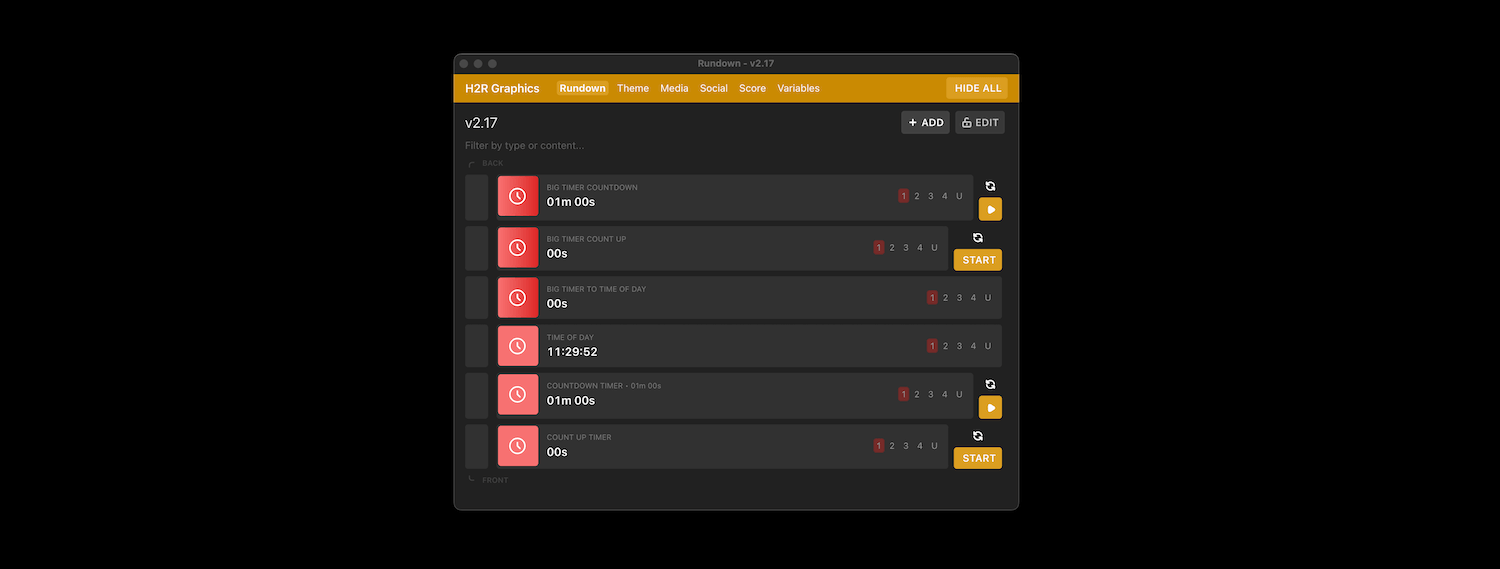
The Time graphic in H2R Graphics covers four kinds of timer:
You choose the display format too, so the same timer can show 10:00, 00:10:00 or just minutes.
Message graphic with “Starting soon” and a Time graphic set to To time of day with your start time.For conferences and panels, presenters need to see the time even when the audience does not. The Pro Speaker timer is designed for a confidence monitor: big, readable from the stage, and separate from what goes to the stream. With multiple outputs you can send the speaker timer to a stage screen and your lower thirds to the stream at the same time.
Timers can be started, paused and reset from the H2R Graphics app, from a phone or tablet on your local network, or from a Stream Deck through the Companion module. That means your operator can run the clock without touching the streaming computer.
Use the free countdown tool for a quick holding screen, or download H2R Graphics for timers you can layer over your show and control from anywhere.
Simplify your graphics workflow
Start using graphics on your live stream or video productions.
Get H2R Graphics product updates
New features, releases and tips, straight to your inbox.
No spam. Unsubscribe any time.